
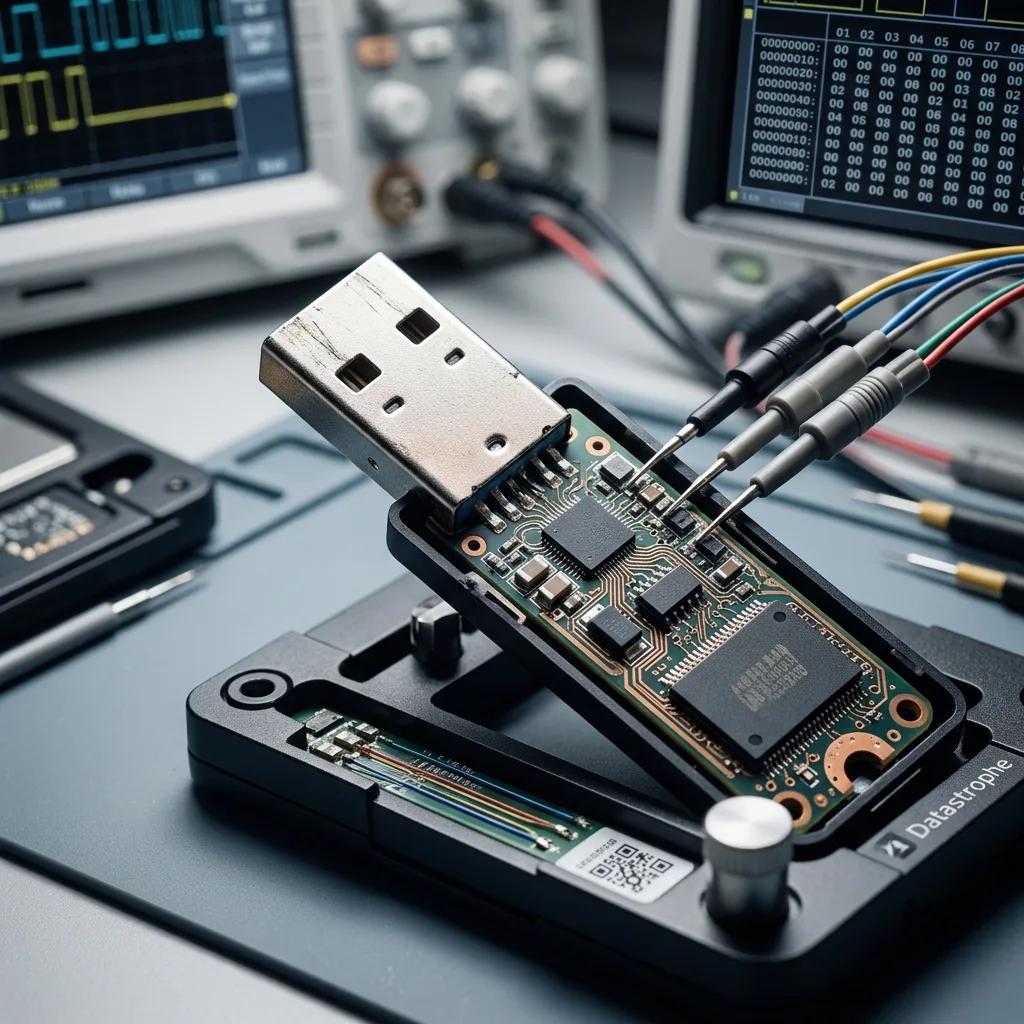

Diagnostic evaluation
Daily transport creates real physical stress
Small size and no moving parts can make a flash drive seem rugged. Daily carry tells a different story: tight pockets, heavy bags, drops, sideways pressure in a USB port, vehicle heat, moisture, dust, and abrupt removal all add repeated stress.
Failure isn't always dramatic. The drive may be recognized intermittently, report an unusual capacity, ask to be formatted, fail to mount or disconnect while being read. At that point, continued attempts are less important than preserving what may still be accessible.
Transport mainly affects two vulnerable areas: the connector and the flash memory. The connector supplies power and transfers data; the memory stores the files. Weakness in either can make the drive unpredictable.
USB flash drive data recovery sets out the service process. This evaluation concerns drives moved frequently, used across several computers or exposed to changing environments.
Typical examples include drives used at tills, during transport or maintenance, for accounts, or to exchange files between sites. The device may not be old, but its role as a quick file handoff point means it's plugged in almost anywhere, sometimes before the latest version has been backed up.

Diagnostic evaluation
Watch for connector damage before total failure
The connector often fails before the NAND. A drive left in a laptop bag or protruding from a checkout terminal, counter, or kiosk can be forced sideways even when its housing looks intact, cracking solder joints or deforming board traces.
Once contact becomes intermittent, the drive can appear and disappear. People then try other ports, computers or angles to find a position that works. Those tests may clarify the symptom, but can also break the remaining connection.
Don't hold a bent drive in place by hand throughout a long copy. If the connection drops, the system may interrupt a write, introduce further errors or change metadata. An unstable read is an incident, not a minor inconvenience.
A lab first seeks to stabilize the device and establish whether the fault lies in the connector, electronics or memory. The method depends on the model and its actual condition, not simply on the message shown by the computer.
Adapters and extension cables also deserve caution. They can help with a difficult-to-reach port, but add another mechanical junction. If the drive works only at a particular angle, assume a hardware fault until evaluation proves otherwise.

Diagnostic evaluation
Account for temperature changes, moisture, and dust
Portable storage can move from cold outdoor air to a heated office, from a hot car to air conditioning, or from a dusty shop floor to an office computer. Those transitions don't erase files automatically, but they raise the risk of condensation, corrosion, and poor electrical contact.
Heat can accelerate the decline of components that are already weak. A drive left in a vehicle, near a heat source or attached for long periods to a poorly ventilated port may become unstable. Symptoms sometimes emerge later, when a large transfer places it under sustained demand.
Moisture and dust create separate risks. A dirty connector can cause intermittent reads, while oxidation may prevent stable power. Random cleaning or scraping can worsen damage when the device is already fragile.
USB flash drives in extreme environments covers heavier exposure. The issue here is ordinary transport, often underestimated because it forms part of normal use.
Physical protection involves more than fitting a cap. A cracked case, a drive carried on a heavy key ring or an exposed connector rubbing inside a pocket can create a weakness gradually. Failure then appears during an important copy instead of at the moment of impact.

Diagnostic evaluation
Treat an interrupted write as a separate risk
Transport isn't the only threat; the flash drive also faces logical damage. Users often carry current documents, updates, exports, or a unique version, and removing the device during a write can leave its file system inconsistent.
An interrupted copy may produce an empty folder, unreadable file, partial folder structure or a partition that asks to be formatted. The hardware can still be healthy while its logical structure is damaged. Writing more data then reduces the chance of reconstructing the earlier state.
Stop using the drive as soon as unusual messages appear. Don't format it, run an automatic repair or copy new files onto it. These operations can replace useful information with fresh data.
For professional use, prevention is clear: never make a transported drive the only location of an important file. A USB flash drive can carry a transfer, but shouldn't be the sole archive. Critical versions need another location and a tested restore route.
Avoid editing an important document directly on the drive as well. Work on a local copy, then copy the finished version back in a controlled way. It adds a step, but substantially reduces corruption caused by rushed removal and unstable computers.
Diagnostic evaluation
Document the transport history before evaluation
Before evaluation, note the symptoms, computers already tried, error messages, expected files, last successful use, transport incident, and earlier attempts. That timeline helps Datastrophe choose a controlled order of analysis.
Keep all physical parts, including the enclosure, a broken fragment, cap, adapter or associated device. A photograph of the connector can help gauge the risk, although it can't replace the physical evaluation.
If the drive is recognized briefly, don't begin a complete copy without a plan. Identify the priority files. In some cases, reading the most important data first is preferable to stressing the whole device.
Everyday causes can make a transported USB flash drive fail, but the consequences are serious when it holds the only version. The measured response is to stop testing, preserve the device, document the incident and rank the data for recovery.
After recovery or replacement, the affected drive shouldn't return to service for critical data. Even when some files are saved, the device has demonstrated a weakness. A new drive costs little compared with repeating the incident.
Diagnostic evaluation
Primary Technical References And Limits
Reference scope — USB flash drive impact data loss: For portable USB flash drive impact data loss, the primary references used are NIST SP 800-86. Physical evidence — USB flash drive impact data loss: They define the relevant preservation, storage or validation concepts, but they cannot establish the exact physical condition, controller state, key availability or business consistency of the device received. Controller evidence — USB flash drive impact data loss: Those points require measurements on the original set and verification on copies.
Diagnostic evaluation
Request A Controlled Evaluation
Complete set — USB flash drive impact data loss: For a technical evaluation of portable USB flash drive impact data loss, provide the complete device or storage set, its associated power and interface parts, the symptom timeline and the priority files. Incident history — USB flash drive impact data loss: Keep member order, labels and authorized credentials separate from the parcel paperwork; do not restart the source merely to obtain a new screenshot.
Laboratory responsibility — USB flash drive impact data loss: Datastrophe performs the diagnosis, integrity checks and recovery directly in its own laboratory with its own team. Free assessment — USB flash drive impact data loss: Diagnosis and the quote are free. Transport boundary — USB flash drive impact data loss: Private round-trip shipping is included; the carrier moves only the sealed parcel and neither accesses nor processes its data.
Controlled list — USB flash drive impact data loss: Before any payment, the client receives the proposed price and a checked list. Verification classes — USB flash drive impact data loss: Each item is classified, in order, as recoverable_verified, partial, detected_unverified or unrecoverable. Payment trigger — USB flash drive impact data loss: Only recoverable_verified items whose contents were checked and found usable are presented as recoverable. No-result rule — USB flash drive impact data loss: Payment is due only after the client accepts both the list and the price.
No-result rule — USB flash drive impact data loss: If no usable data is verified, recovery fails, or the client declines the list or price, no standard fee is payable. Rare-part exception — USB flash drive impact data loss: The only exception is a rare, costly and non-refundable part, which may be ordered only after a separate, explicit and priced proposal has been accepted.